User activity tracking is crucial for security, auditing, and analytics in real-world web applications. Keeping track of a user's login and logout times is one of the most popular needs. Using an audit log table, we will create a straightforward and efficient ASP.NET MVC system in this post to monitor user login and logout times.

Why Do We Need Audit Tracking?
Tracking login and logout activity helps in:
- Monitoring user sessions
- Maintaining security logs
- Analyzing user behavior
- Debugging issues related to authentication
Features Implemented
- User login system
- Session management
- Login time recording
- Logout time update
- Audit log tracking
Database Design
We will use two tables: users and auditlogs.
CREATE TABLE users (
Id INT IDENTITY PRIMARY KEY,
Name NVARCHAR(100),
Contact NVARCHAR(21),
Email NVARCHAR(150),
Password NVARCHAR(200)
);
CREATE TABLE auditlogs (
AuditId INT PRIMARY KEY IDENTITY,
UserId INT,
Username NVARCHAR(100),
LoginDate DATETIME,
LogoutDate DATETIME NULL
);
Explanation
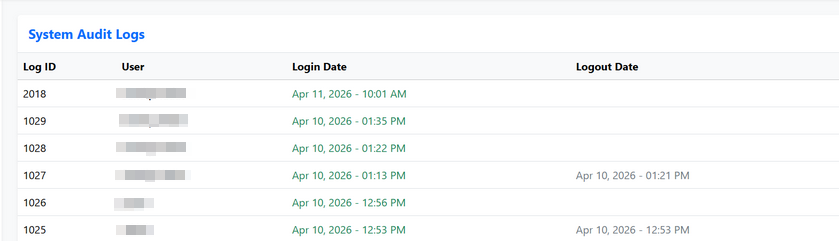
- LoginDate stores the login timestamp
- LogoutDate is initially NULL and updated during logout
- Each login creates a new record in auditlogs
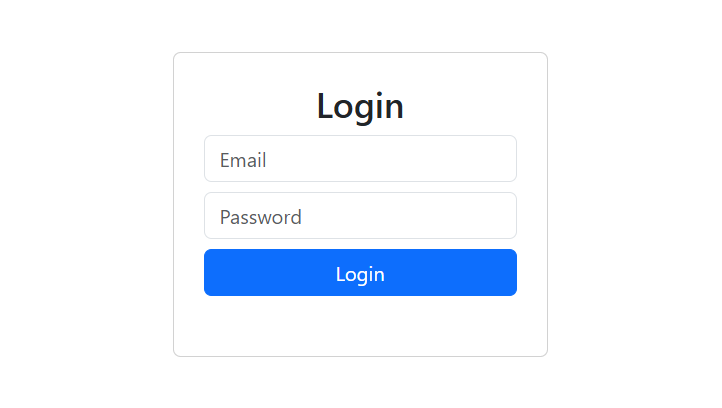
Step 1: Login Logic
When a user logs in successfully:
- Validate credentials
- Store session values
- Insert login time into audit table
loginc
public void InsertLogin(int userId, string username)
{
string query = @"INSERT INTO auditlogs (UserId, Username, LoginDate)
VALUES (@UserId, @Username, GETDATE())";
using (SqlConnection con = new SqlConnection(_connectionString))
{
SqlCommand cmd = new SqlCommand(query, con);
cmd.Parameters.AddWithValue("@UserId", userId);
cmd.Parameters.AddWithValue("@Username", username);
con.Open();
cmd.ExecuteNonQuery();
}
}
Step 2: Logout Logic
When the user logs out:
- Find the latest active session
- Update logout time
logoutc
public void UpdateLogout(int userId)
{
string query = @"UPDATE auditlogs
SET LogoutDate = GETDATE()
WHERE UserId = @UserId AND LogoutDate IS NULL";
using (SqlConnection con = new SqlConnection(_connectionString))
{
SqlCommand cmd = new SqlCommand(query, con);
cmd.Parameters.AddWithValue("@UserId", userId);
con.Open();
cmd.ExecuteNonQuery();
}
}
Important Note
We use LogoutDate IS NULL to ensure only the active session is updated.
Step 3: Controller Implementation
Login Action
[HttpPost]
public IActionResult Login(string email, string password)
{
var user = _userService.GetUser(email, password);
if (user != null)
{
HttpContext.Session.SetInt32("UserId", user.Id);
HttpContext.Session.SetString("Username", user.Name);
_auditService.InsertLogin(user.Id, user.Name);
return RedirectToAction("Index", "Home");
}
ViewBag.Error = "Invalid Credentials";
return View();
}
Logout Action
public IActionResult Logout()
{
int? userId = HttpContext.Session.GetInt32("UserId");
if (userId != null)
{
_auditService.UpdateLogout(userId.Value);
}
HttpContext.Session.Clear();
return RedirectToAction("Login");
}
Output
After login and logout operations, the auditlogs table will store data like:
Best Practices
- Use a service layer instead of writing SQL in controllers
- Always validate user input
- Avoid storing plain text passwords (use hashing)
- Handle session expiration properly
Common Mistakes
- Not updating logout time
- Inserting duplicate login records unnecessarily
- Mixing business logic inside controllers
- Ignoring null session cases
Conclusion
In this article, we implemented a simple audit tracking system in ASP.NET MVC to record user login and logout time. This approach can be extended further to include additional tracking details such as IP address, device information, and user activity logs.