We are going to create an editable HTML table where we set and get the HTML table row value using Asp.Net MVC.
In this step-by-step walkthrough you will learn the following things.
The article is divided into two parts/sections

- Send Data From Controller To View -- Bind to HTML Table
- Receiving HTML Table data client side.
SEND Data to View From Controller, SECTION 1
- How to fetch the data from Database - SQL Server using Entity Framework?
- How to send list collection data to View?
- How to Iterate the List Collection in View?
RECEIVED Table Data Client Side, SECTION 2
- How to get particular row data with different methods?
- Why is Method 1 better and more reliable than Method 2?
- How to get the values of all rows of the HTML table?
Section 1. Start of SEND Data to View From Controller
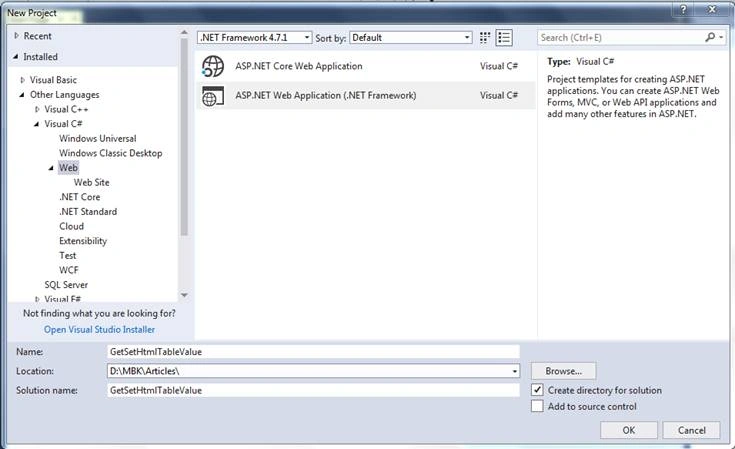
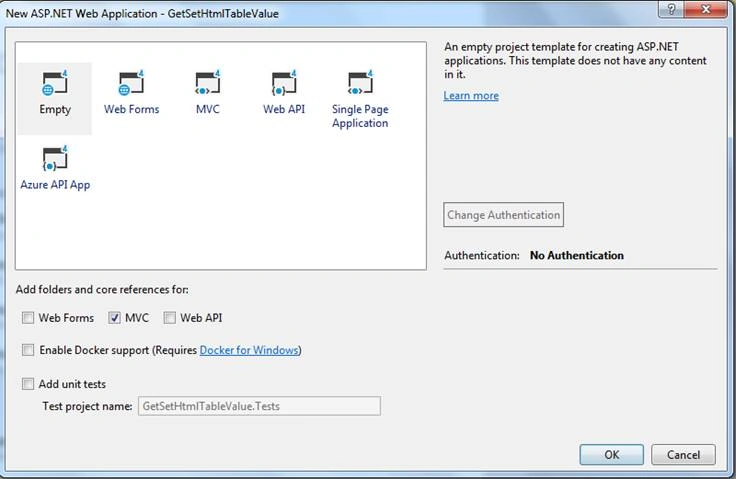
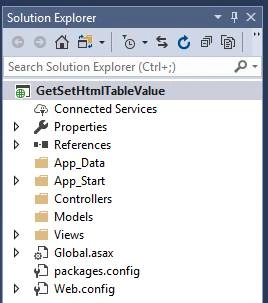
Default View of Solution Explorer.
tblMembers - Table Structure
USE [MbkTest]
GO
/****** Object: Table [dbo].[tblMembers] Script Date: 12-Nov-19 7:33:53 PM ******/
SET ANSI_NULLS ON
GO
SET QUOTED_IDENTIFIER ON
GO
SET ANSI_PADDING ON
GO
CREATE TABLE [dbo].[tblMembers](
[MemberID] [int] IDENTITY(1,1) NOT NULL,
NULL,
NULL,
PRIMARY KEY CLUSTERED
(
[MemberID] ASC
)WITH (PAD_INDEX = OFF, STATISTICS_NORECOMPUTE = OFF, IGNORE_DUP_KEY = OFF, ALLOW_ROW_LOCKS = ON, ALLOW_PAGE_LOCKS = ON) ON [PRIMARY]
) ON [PRIMARY]
GO
SET ANSI_PADDING OFF
GO
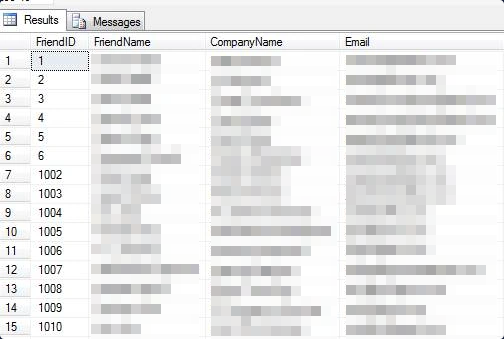
Table sample data view.
Now right-click on the project and select Add New Item.
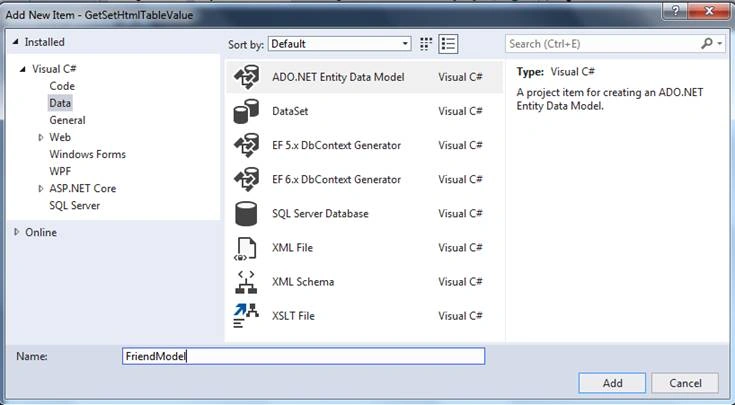
Select EF Designer From the Database then click on the NEXT button.
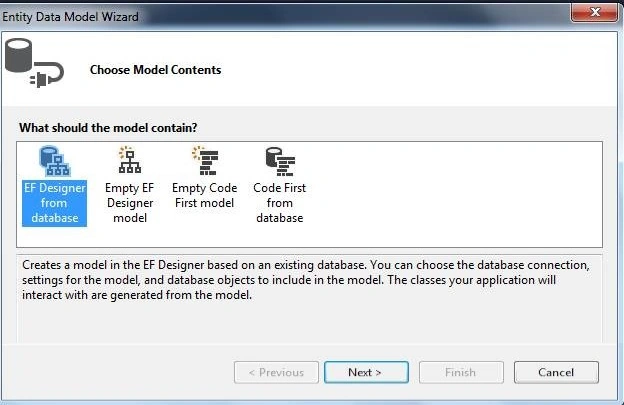
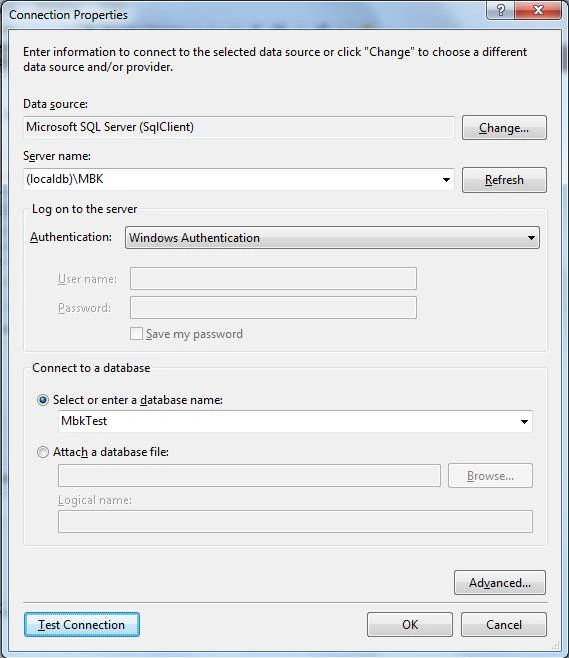
In below dialog box do the following things,
- Data Source: Microsoft SQL Server.
- Server Name: Your Sql Server detail.
- Authentication: As per your SQL server.
- Select or Enter a database name: Select your database.
- Click on Test Connection.
Then click on the OK button.
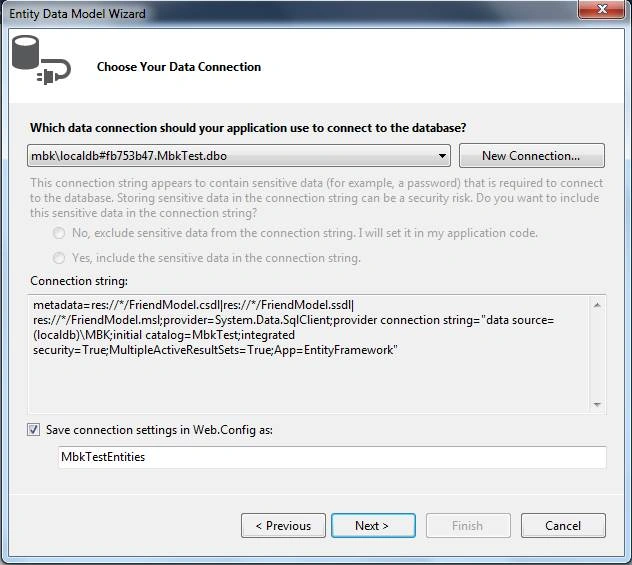
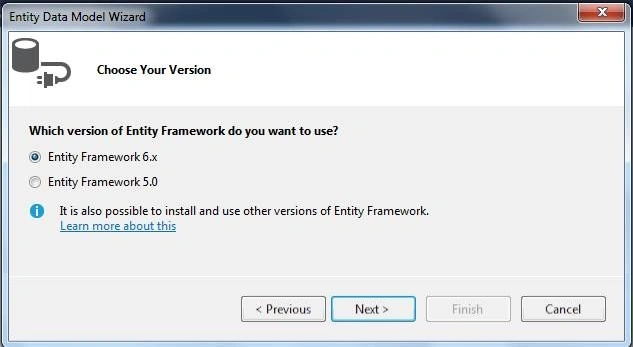
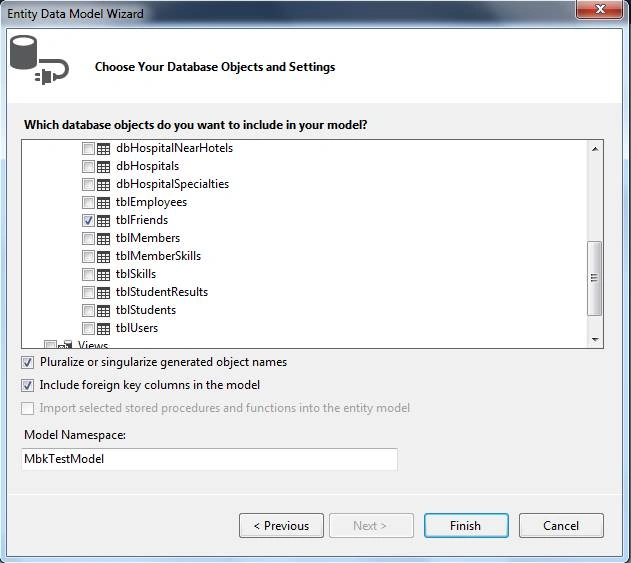
Select the Table(s) of your choice.
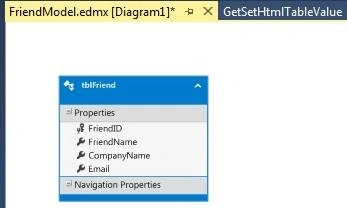
As you click on the FINISH button edmx file will be generated with a selected table(s).
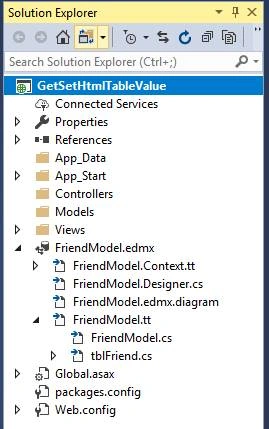
You can see this in the Solution Explorer window.
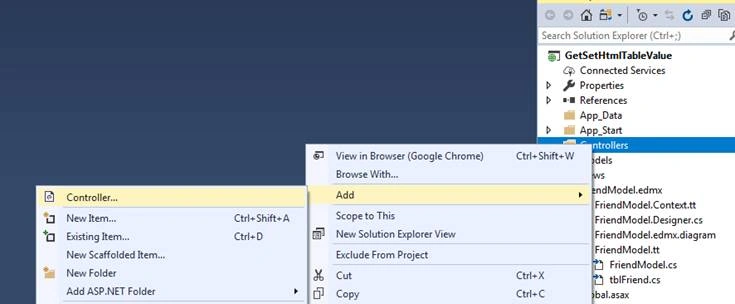
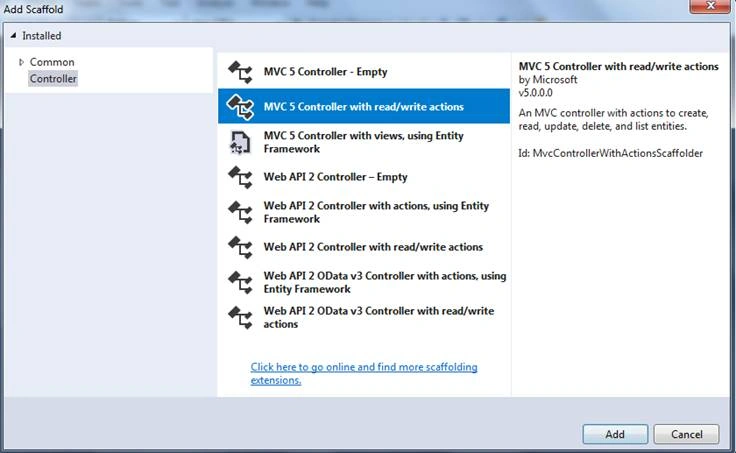
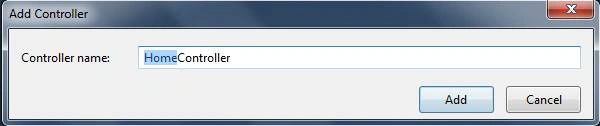
Right-click on the CONTROLLERS folder and click on ADD --> CONTROLLER.
Default Actionmethod of HomeControllers.
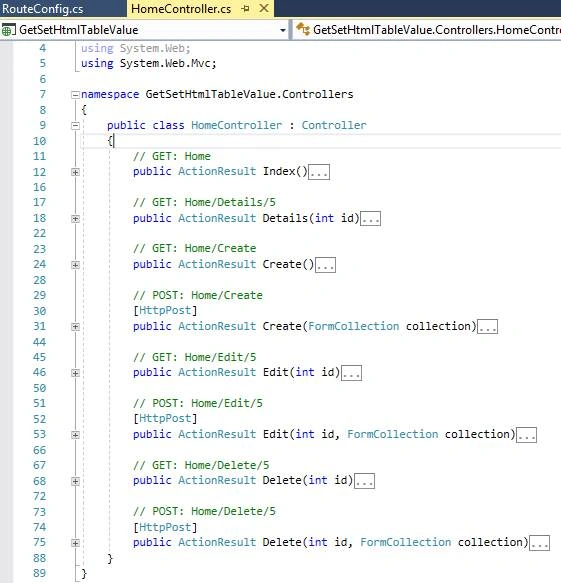
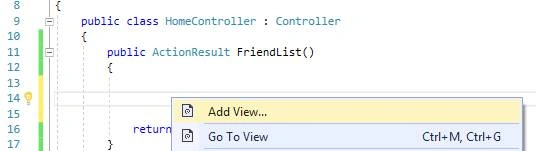
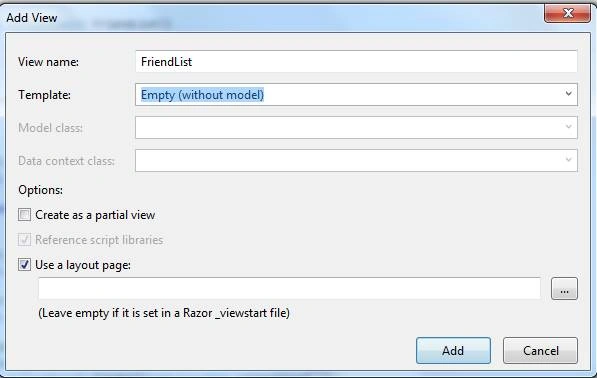
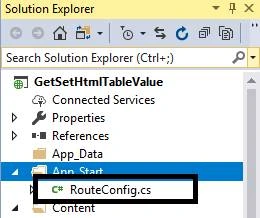
Default View - RouteConfig.cs
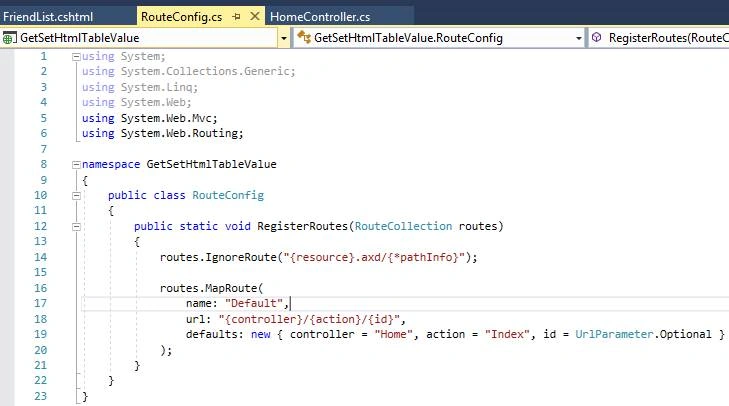
As per the above code default ActionResult “Index” is executing. Now we will change ActionResult (action) to “FriendResult”. After changing/updating the following things in RouteConfig.cs our default action method is FriendResult.
Now it's changed to this,
RouteConfig.cs File Code
using System;
using System.Collections.Generic;
using System.Linq;
using System.Web;
using System.Web.Mvc;
using System.Web.Routing;
namespace GetSetHtmlTableValue
{
public class RouteConfig
{
public static void RegisterRoutes(RouteCollection routes)
{
routes.IgnoreRoute("{resource}.axd/{*pathInfo}");
routes.MapRoute(
name: "Default",
url: "{controller}/{action}/{id}",
defaults: new { controller = "Home", action = "FriendList", id = UrlParameter.Optional }
);
}
}
}
Now press F5, following,
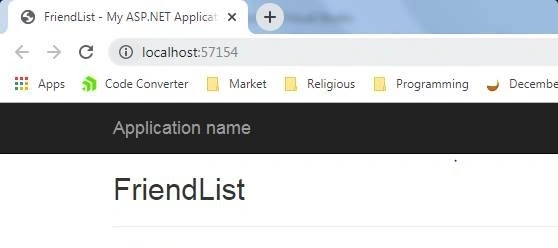
Now Update the following code to the respective files.
HomeController.cs code
using System;
using System.Collections.Generic;
using System.Linq;
using System.Web;
using System.Web.Mvc;
namespace GetSetHtmlTableValue.Controllers
{
public class HomeController : Controller
{
public ActionResult FriendList()
{
// Create Instance of EntityFramework dbContext Class
MbkTestEntities db = new MbkTestEntities();
// Get all the friends in list collection.
var FriendList = db.tblFriends.ToList();
// Send data to view. In view we generate html table with friend datas.
return View(FriendList);
}
// GET: Home
public ActionResult Index()
{
return View();
}
// GET: Home/Details/5
public ActionResult Details(int id)
{
return View();
}
// GET: Home/Create
public ActionResult Create()
{
return View();
}
// POST: Home/Create
[HttpPost]
public ActionResult Create(FormCollection collection)
{
try
{
// TODO: Add insert logic here
return RedirectToAction("Index");
}
catch
{
return View();
}
}
// GET: Home/Edit/5
public ActionResult Edit(int id)
{
return View();
}
// POST: Home/Edit/5
[HttpPost]
public ActionResult Edit(int id, FormCollection collection)
{
try
{
// TODO: Add update logic here
return RedirectToAction("Index");
}
catch
{
return View();
}
}
// GET: Home/Delete/5
public ActionResult Delete(int id)
{
return View();
}
// POST: Home/Delete/5
[HttpPost]
public ActionResult Delete(int id, FormCollection collection)
{
try
{
// TODO: Add delete logic here
return RedirectToAction("Index");
}
catch
{
return View();
}
}
}
}
FriendList.cshtml code
@* Receiving data from Controller *@
@model IEnumerable<tblFriend>
@* Setting Page Title *@
@{
ViewBag.Title = "Friend List";
}
<style>
/* CSS for table and input (textbox) */
table, td, th {
border: 1px solid black;
}
table, tr {
border-collapse: collapse;
}
input[type=text] {
width: 100%;
}
th {
height: 50px;
text-align: center;
}
</style>
<h2>Friend List</h2>
<input type="button" value="Get All Rows Data" class="btngetvalue" />
<table>
<thead>
<tr>
<th>
FRIEND NAME
</th>
<th>
COMPANY NAME
</th>
<th>
EMAIL ID
</th>
<th>
ACTION TYPE 1
</th>
<th>
ACTION TYPE 2
</th>
</tr>
</thead>
<tbody>
@* Loop Entire Friend list and paste data to textbox(input) *@
@foreach (var item in Model)
{
// for ID purpose writing this code
var friendid = "friend" + Convert.ToString(item.FriendID);
<input type="hidden" id="@friendid" value="@item.FriendID" />
<tr class="">
<td>
<input type="text" value="@item.FriendName" name="FriendName" />
</td>
<td>
<input type="text" value="@item.CompanyName" name="CompanyName" />
</td>
<td>
<input type="text" value="@item.Email" name="Email" />
</td>
@* Html Button onclick calling UPDATEROW which passing parameter of friendid. *@
<td><input type="button" value="Get Row Value Type 1" class="btnrowvalue1" /></td>
<td><input type="button" value="Get Row Value Type 2" class="btnrowvalue2" /></td>
</tr>
}
</tbody>
</table>
<label id="allrowsdata"><b>All Row Data Come Here</b></label>
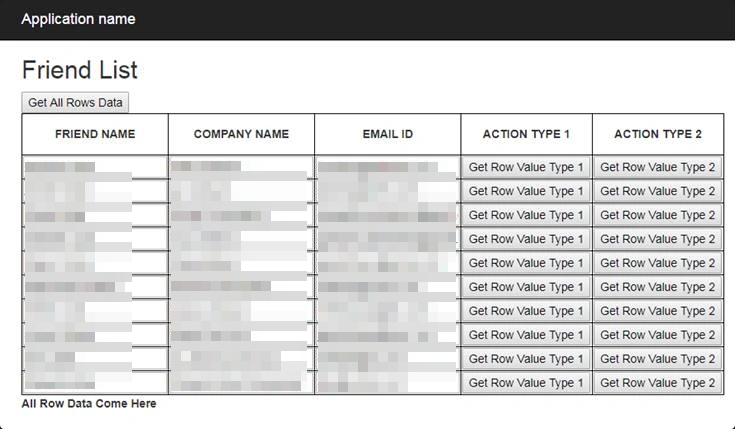
Output
RouteConfig.cs CODE
using System;
using System.Collections.Generic;
using System.Linq;
using System.Web;
using System.Web.Mvc;
using System.Web.Routing;
namespace GetSetHtmlTableValue
{
public class RouteConfig
{
public static void RegisterRoutes(RouteCollection routes)
{
routes.IgnoreRoute("{resource}.axd/{*pathInfo}");
routes.MapRoute(
name: "Default",
url: "{controller}/{action}/{id}",
defaults: new { controller = "Home", action = "FriendList", id = UrlParameter.Optional }
);
}
}
}
_Layout. cshtml CODE
<!DOCTYPE html>
<html>
<head>
<meta charset="utf-8" />
<meta name="viewport" content="width=device-width, initial-scale=1.0">
<title>@ViewBag.Title - My ASP.NET Application</title>
<link href="~/Content/Site.css" rel="stylesheet" type="text/css" />
<link href="~/Content/bootstrap.min.css" rel="stylesheet" type="text/css" />
<script src="~/Scripts/modernizr-2.6.2.js"></script>
<script src="~/Scripts/jquery-1.10.2.min.js"></script>
<script src="~/Scripts/bootstrap.min.js"></script>
</head>
<body>
<div class="navbar navbar-inverse navbar-fixed-top">
<div class="container">
<div class="navbar-header">
<button type="button" class="navbar-toggle" data-toggle="collapse" data-target=".navbar-collapse">
<span class="icon-bar"></span>
<span class="icon-bar"></span>
<span class="icon-bar"></span>
</button>
@Html.ActionLink("Application name", "Index", "Home", new { area = "" }, new { @class = "navbar-brand" })
</div>
<div class="navbar-collapse collapse">
<ul class="nav navbar-nav">
</ul>
</div>
</div>
</div>
<div class="container body-content">
@RenderBody()
<hr />
<footer>
<p>© @DateTime.Now.Year - My ASP.NET Application</p>
</footer>
</div>
</body>
</html>
HomeController.cs CODE
using System;
using System.Collections.Generic;
using System.Linq;
using System.Web;
using System.Web.Mvc;
namespace GetSetHtmlTableValue.Controllers
{
public class HomeController : Controller
{
public ActionResult FriendList()
{
// Create Instance of EntityFramework dbContext Class
MbkTestEntities db = new MbkTestEntities();
// Get all the friends in list collection.
var FriendList = db.tblFriends.Take(10).ToList();
// send data to view. In view we generate html table with friend datas.
return View(FriendList);
}
// GET: Home
public ActionResult Index()
{
return View();
}
// GET: Home/Details/5
public ActionResult Details(int id)
{
return View();
}
// GET: Home/Create
public ActionResult Create()
{
return View();
}
// POST: Home/Create
[HttpPost]
public ActionResult Create(FormCollection collection)
{
try
{
// TODO: Add insert logic here
return RedirectToAction("Index");
}
catch
{
return View();
}
}
// GET: Home/Edit/5
public ActionResult Edit(int id)
{
return View();
}
// POST: Home/Edit/5
[HttpPost]
public ActionResult Edit(int id, FormCollection collection)
{
try
{
// TODO: Add update logic here
return RedirectToAction("Index");
}
catch
{
return View();
}
}
// GET: Home/Delete/5
public ActionResult Delete(int id)
{
return View();
}
// POST: Home/Delete/5
[HttpPost]
public ActionResult Delete(int id, FormCollection collection)
{
try
{
// TODO: Add delete logic here
return RedirectToAction("Index");
}
catch
{
return View();
}
}
}
}
FriendList.cshtml CODE
@* Receiving data from Controller *@
@model IEnumerable<tblFriend>
@* Setting Page Title *@
@{
ViewBag.Title = "Friend List";
}
<style>
/* CSS for table and input (textbox) */
table, td, th {
border: 1px solid black;
}
table, tr {
border-collapse: collapse;
}
input[type=text] {
width: 100%;
}
th {
height: 50px;
text-align: center;
}
</style>
<script>
$(document).ready(function () {
// Get All Rows Value of HTML Value
$(".btngetvalue").click(function () {
var address = [];
$("table tr td input[type='text']").each(function () {
var textval = $(this).val();
address.push(textval);
});
var wholetabledata = address.toString();
$("#allrowsdata").text("ALL ROWS DATA: \n\n\n" + wholetabledata);
});
// METHOD 1 to get Table Row Value
// Method 1 is good and reliable than Method 2
$(".btnrowvalue1").click(function () {
var tr = $(this).closest('tr');
var FirstCol = tr.find('input[name="FriendName"]').val();
var SecondCol = tr.find('input[name="CompanyName"]').val();
var ThirdCol = tr.find('input[name="Email"]').val();
alert('Type1 : ' + FirstCol + ' ' + SecondCol + ' ' + ThirdCol);
});
// METHOD 2 to get Table Row Value
$(".btnrowvalue2").click(function () {
var tr = $(this).closest('tr');
var FirstCol = tr.find('td:eq(0) input').val();;
var SecondCol = tr.find('td:eq(1) input').val();
var ThirdCol = tr.find('td:eq(2) input').val();
alert('Type2 : ' + FirstCol + ' ' + SecondCol + ' ' + ThirdCol);
});
});
</script>
<h2>Friend List</h2>
<input type="button" value="Get All Rows Data" class="btngetvalue" />
<table>
<thead>
<tr>
<th>
FRIEND NAME
</th>
<th>
COMPANY NAME
</th>
<th>
EMAIL ID
</th>
<th>
ACTION TYPE 1
</th>
<th>
ACTION TYPE 2
</th>
</tr>
</thead>
<tbody>
@* Loop Entire Friend list and paste data to textbox(input) *@
@foreach (var item in Model)
{
//for ID purpose writing this code
var friendid = "friend" + Convert.ToString(item.FriendID);
<input type="hidden" id="@friendid" value="@item.FriendID" />
<tr class="">
<td>
<input type="text" value="@item.FriendName" name="FriendName" />
</td>
<td>
<input type="text" value="@item.CompanyName" name="CompanyName" />
</td>
<td>
<input type="text" value="@item.Email" name="Email" />
</td>
@* Html Button onclick calling UPDATEROW which passing parameter of friendid.*@
<td><input type="button" value="Get Row Value Type 1" class="btnrowvalue1" /> </td>
<td><input type="button" value="Get Row Value Type 2" class="btnrowvalue2" /> </td>
</tr>
}
</tbody>
</table>
<label id="allrowsdata"><b>All Row Data Come Here</b></label>
End of Receiving Table Data Client Side.